








Off-Campus Access (OpenAthens)
You can securely and seamlessly access all electronic resources (e-journals, e-books, databases, and open-access tools) subscribed to or purchased by the Boğaziçi University Department of Library and Documentation from off-campus via the OpenAthens Single Sign-On (SSO) infrastructure.
Thanks to the OpenAthens system, you can use these resources by authenticating your institutional identity directly through the relevant publisher's website without needing browser settings (proxy) or a VPN installation.
Access Methods
You can access electronic resources from off-campus using two different methods:
A. Access via the Library Web Page (Recommended)
1. Resource Selection: Click on the link for the resource you wish to access from the Electronic Resources or Databases list.
2. Authentication Screen: The system will automatically redirect you to the Boğaziçi University Central Authentication screen.
3. User Credentials: On the screen that opens, enter only the username portion of your institutional email address (without the @bogazici.edu.tr or @std.bogazici.edu.tr extension) in the Boun Kullanıcı Adı / Boun Username field, enter your institutional email password in the Şifre / Password field, and click the Giriş Yap (Log In) button.
4. Full-Text Access: Once authentication is complete, you will be redirected directly to the relevant resource with access authorization.
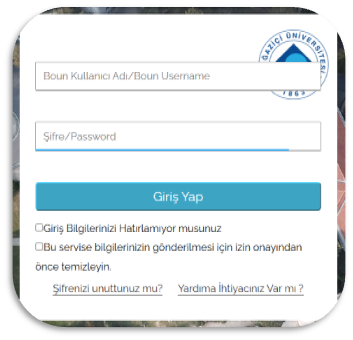
Figure 1: Central Authentication Screen
B. Direct Access via the Publisher’s Website (Institutional Login)
You can also use our institutional subscription when you reach a publisher's or database's page directly through search engines:
Example: Accessing via the American Physical Society (APS)
1. When accessing the American Physical Society (APS, journals.aps.org) page directly from off-campus, click the "Sign In" link located in the upper right corner.
2. On the screen that opens, select the "Sign in via your Institution" option, and proceed by selecting Boğaziçi University or Boğaziçi University Library (Open Athens) from the institution search field.
3. On the Boğaziçi University Central Authentication page to which you are redirected, gain access by entering only the username portion of your institutional email (without the @bogazici.edu.tr extension) and your password.
Note: On other publishers' websites, the institutional login option is typically listed under names such as "Institutional Login", "Access through your institution", "Shibboleth", or "OpenAthens Login".
Usage Rules and Important Reminders
Support and Contact
You can forward your technical issues and requests regarding off-campus access or electronic resources to the Department of Library and Documentation via elibrary@bogazici.edu.tr.
